

⚠️ Incident: Data Sync
On September 18, we made a server update that unexpectedly caused a bug. This bug could mean some of the changes you made to your collection stayed only on your device instead of syncing to our servers. This might still happen even if all your devices appear to be syncing seamlessly with each other.
If you used Dex and updated your cards between September 18 and October 3, we recommend following the quick steps below. If you didn’t use Dex during that time, you don’t need to do anything.
🎯 What You Need to Do
To make sure your collection is 100% in sync:
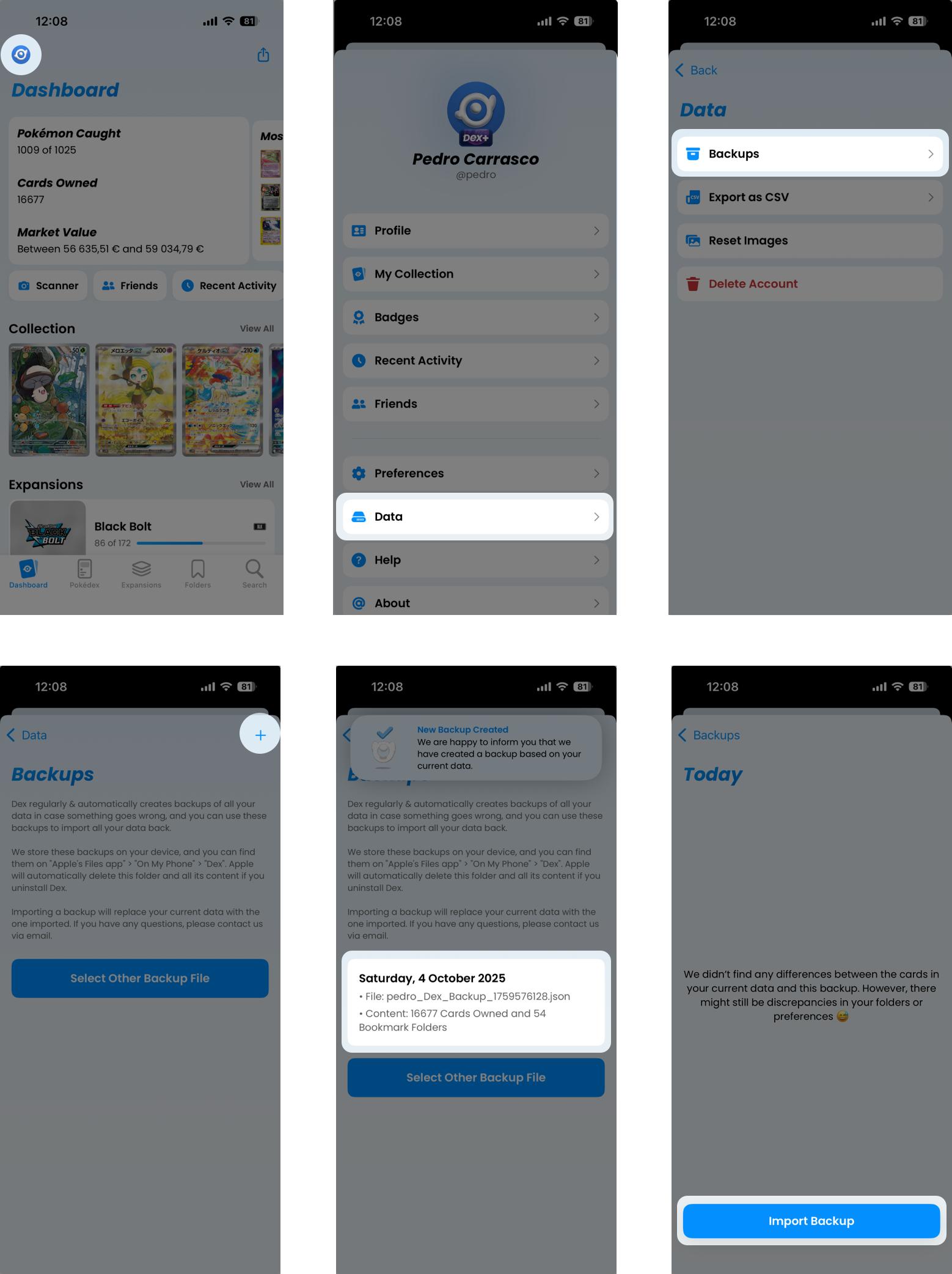
- Update to Dex 20.0.4.
- Open Settings.
- Tap Data.
- Tap Backups.
- Create a new backup by tapping + in the top-right corner.
- Select your new backup.
- Tap Import.
- That’s it — you only need to do this on one device. 🎉
💭 Final Thoughts
We’re very sorry for the trouble or stress this may have caused. Thank you for your patience, trust, and continued support. If you have any questions or notice anything unusual, please reach out — we’re here to help.